
Warframe Market Orders
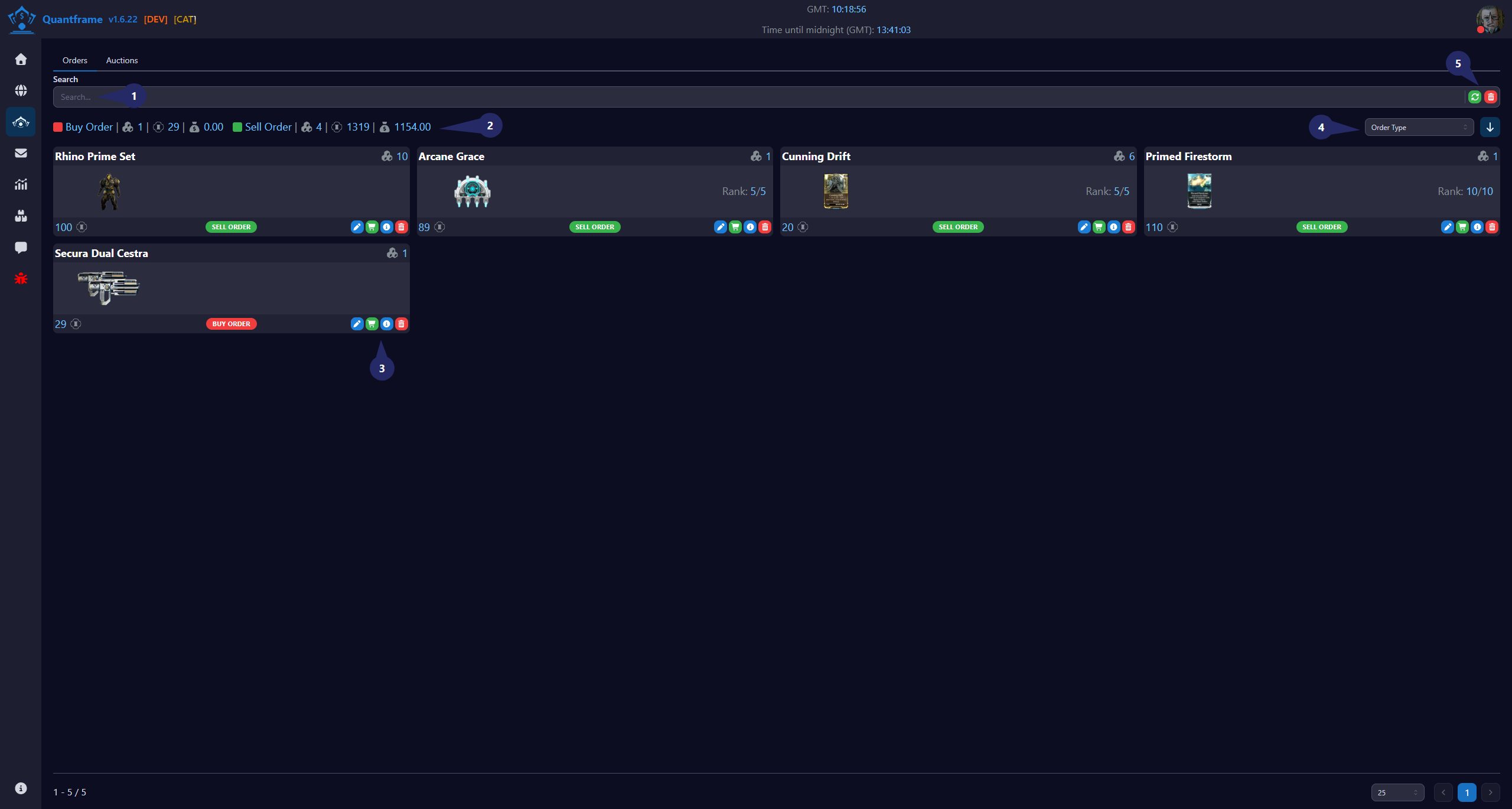
The Warframe Market Orders feature allows you to manage your buy and sell orders directly through QuantFrame. This feature provides a streamlined interface for creating, monitoring, and adjusting your orders based on market conditions.
1. Search & Filter Section
Use this area to quickly find items in the table.
Features
- Search by item name.
- Filter displayed records.
- View current stock entries.
- Supports fast navigation through large inventories.
2. Order Summary & Statistics Bar
Summarizes key order metrics for quick reference for buy and sell orders.
| Icon | Function | Description |
|---|---|---|
| Total listed | View the total number of orders currently listed on the market. | |
| Total platinum | View the total platinum value of all listed orders | |
| Potential Profit | View the potential profit for the item based on current market prices |
3. Per-Item Action Controls
Available actions for each order record.
| Icon | Function | Description |
|---|---|---|
| Sell Manually | Sell the item manually at a custom price | |
| Sell as listed | Sell the item at the listed price | |
| View details | View detailed information about the item | |
| Delete item | Delete the item from the inventory and the market |
4. Sort Orders
Sort your orders by any of the following criteria:
| Sort Option | Description |
|---|---|
| Created At | Sort by when the order was created |
| Platinum | Sort by platinum price |
| Updated At | Sort by when the order was last updated |
| Order Type | Sort by buy or sell order type |
5. Search Button's
Available batch actions for all orders in the table.
| Icon | Function | Description | Requires Patreon |
|---|---|---|---|
| Update | Refresh all orders from Warframe Market | ||
| Delete | Delete selected orders from the table |